This is a guest post by Julian Hartley…

Gather All The Information You Need

For this to happen, you have to first discuss the basics with the client. You should ask questions like who is the target audience, what message needs to be transmitted, how many pages and what dimensions the layout should have.

It’s always useful to ask for an example of previous designs similar to the one he needs now. Still, note that this can limit your creativity. In the end, it’s up to you if you ask for a sample or not.

Don’t forget to talk about budget and deadlines. If you want a good work relationship, pay attention to these aspects because they are important too.

Create An Attractive Website Presentation

Let’s assume you have to design a website. If you have to create business cards or posters, we are talking about a one-page layout and it’s a lot simpler. However, the same steps are to be followed, since only the complexity of the project changes.

Graphic Design Strategies 101

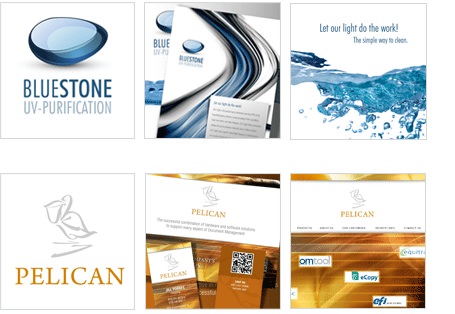
Graphic Design Strategies - Example Designs

Now that you know how many pages it should have, think about how they can be linked together. You can opt for a linear, a hierarchic or a random navigation structure.

Next, visualize. How could you make the site look the way your client wants and still use your sense of creativity? Imagine each section of the site starting with the position of elements on the main page.

Think about where the menu bar would look best. It may be horizontal at the top or vertical on the right or left side. Decide where you will put banners and advertisements. Think about colors and formats. Should you use bold headings colored in red or it would be better to use more calm tones like green and blue?

It always helps to translate your thoughts on paper. So, draw a sketch and add details along the way. You will be erasing, so use a pencil. After you got your first draft, wait for a day or two before reviewing it. You will certainly get new ideas of how things can be put together. A fresh perspective is what you need to improve your work.

Bring It All Together

Graphic design projects aren’t simply a creative endeavor. While you may have been chosen because of your eye for creativity and detail, it ultimately is still a business transaction. Graphic design projects require structure as well. The most basic outline should include the purpose of the site, the targeted audience, a general layout, a color scheme and navigation structure.

About the Author: Julian Hartley consults on corporate branding and graphic design projects on behalf of Vionet Graphics, Inc.


A recent website maintenance client of mine redesigned their website. The new website looks really good and I wish them the best in terms of improved conversion rates and user interaction.

Unfortunately, a redesign must involve many more considerations than just a new skin & the same website content. When you fail to consider the impact a new site will have on your search engine rankings, you stand to lose a lot… it’s not an urban myth or a misnomer.

In the following examples, I hope to show those considering a site redesign just how important it is to factor SEO into the design and migration process. And not only after the fact, but from the beginning of the redesign process.

In this example, I knew the client was working on a new website, but because we were only providing maintenance, they did not notify us when the new site was going to launch, nor did they ask us to look at it for any SEO considerations.

How Quickly You Can Lose Search Engine Rankings After a Redesign

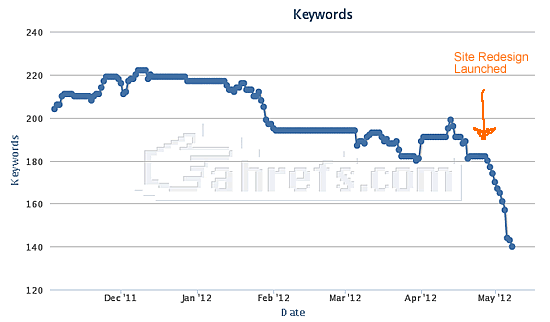
Less than a week after launch, the website is already seeing some pretty significant negative search engine results – Google specifically.

Website Redesign Lost Keyword Rankings

Website Redesign Lost Keyword Rankings

You can see pretty clearly in the chart above that this website’s rankings started tanking immediately after the new website launched at the beginning of May.

Lost Traffic & Sales

Of course, it’s probably a bit early for the client to realize that they’re losing rankings and the subsequent traffic and sales that would have occurred. They may not see the full impact of these omissions for several months since they are a travel-related business and they book well in advance. I would guess that they’ll start panicking and/or placing many calls to their SEO agency before the end of the month. In 3 months, they will likely be in full panic mode, because this is a niche where they had done very well.

What they did right

Honestly, it’s easy to start here because they covered some really basic search migration strategies that they may have otherwise forgotten if they didn’t have an SEO company.

  • Titles and Meta Tags were migrated to the corresponding new pages.
  • Optimized content (most of it) was migrated to the corresponding new pages.
See, that was pretty easy… they didn’t do a whole lot sadly.

Where Did They Go Wrong?

  • Their entire URL structure of the website changed, yet they failed to properly migrate the pages to these new URLs. On most pages I sampled, the old site pages redirected to a single “booking” page on the new website. This would be fine if they had done the redirects correctly, but they used a “302 temporary” redirect instead of a “301 permanent” redirect. This does not pass any value onto the new pages and because the old pages don’t/can’t load anymore, those pages will devalue over time.
  • The old website was built using WordPress, which inherently had numerous SEO advantages built-in over an independent site by a new developer (current site). They could have mimicked some of the features and benefits of WordPress, but the new site doesn’t do anything remotely close.
  • The new website includes dynamic URLs, whereas the old website was clean and provided SEO-friendly URLs throughout.
  • Duplicate content – The website previously included a little bit of duplicate content, but the new design includes nearly duplicate content for each rental property (40+ pages). This is mostly due to the dynamic URLs that they switched to. (btw… Google HATED duplicate content)
  • The website includes a new focus on higher resolution and wider images in a rotating banner. While the photos are beautiful and portray the rentals in a positive light, the site loads pretty slowly:

Learn Anything?

A website redesign is not something to take lightly or to consider late in the design process. As you can see from the example above and perhaps some additional information I can collect later from the client, a redesign can have drastic effects on your search engine visibility very quickly. Whatever you do, please consider SEO from the very beginning of your redesign discussions and planning. You will save yourself a lot of future headaches and grief over lost traffic and revenue.


This is an awesome script you can add to serve images on iPads and next-gen high resolution devices dynamically. I’ll let the description of this script tell the story…  Foresight.js

Foresight.js gives webpages the ability to tell if the user’s device is capable of viewing high-resolution images (such as the 3rd generation iPad) before the image is requested from the server. Additionally, it judges if the user’s device currently has a fast enough network connection for high-resolution images. Depending on device display and network connectivity, foresight.js will request the appropriate image for the webpage.